lcp-optimizer-universal-pro
🚀 LCP Optimizer Universal PRO






Free WordPress plugin to automatically optimize Core Web Vitals (LCP, INP, CLS) with zero configuration required.
Compatible with all major themes, page builders (Elementor, Divi, etc.), and cache plugins (WP Rocket, LiteSpeed, Autoptimize).
📸 Screenshots
Base Settings - One-Click Optimization
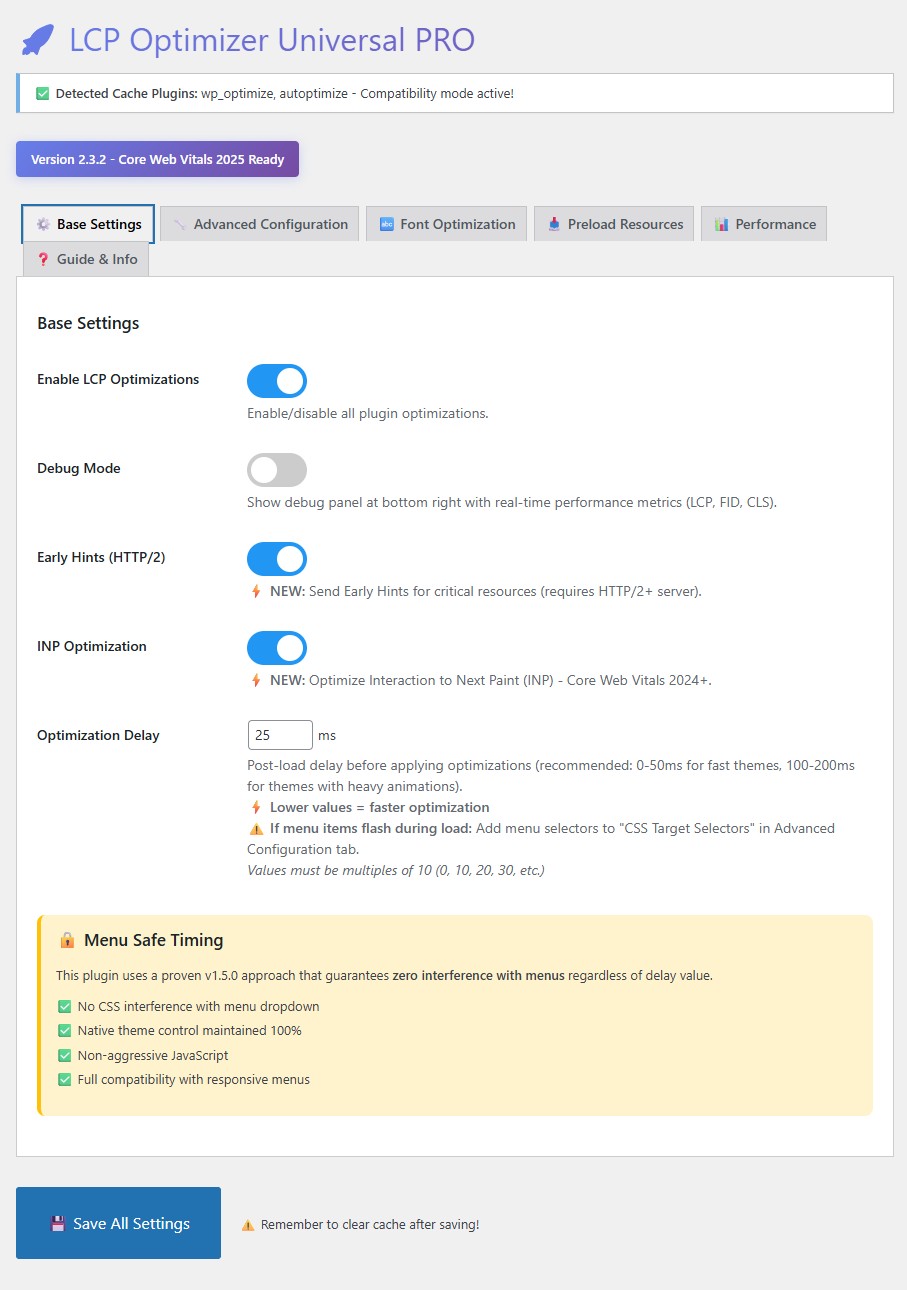 Enable optimizations with a single toggle. Smart defaults work out of the box.
Advanced Configuration - Custom Selectors
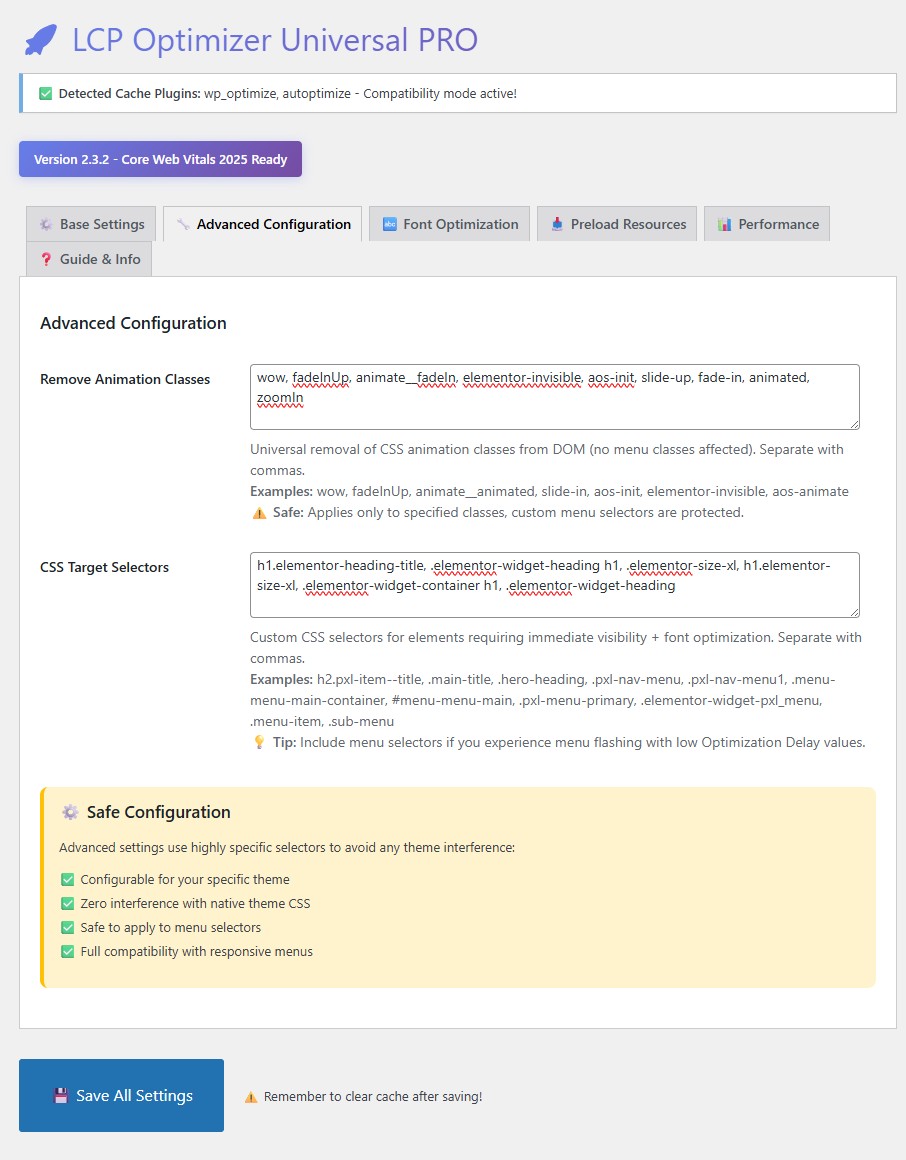 Fine-tune CSS animation removal and target selectors for your theme.
Font Optimization - Google Fonts Control
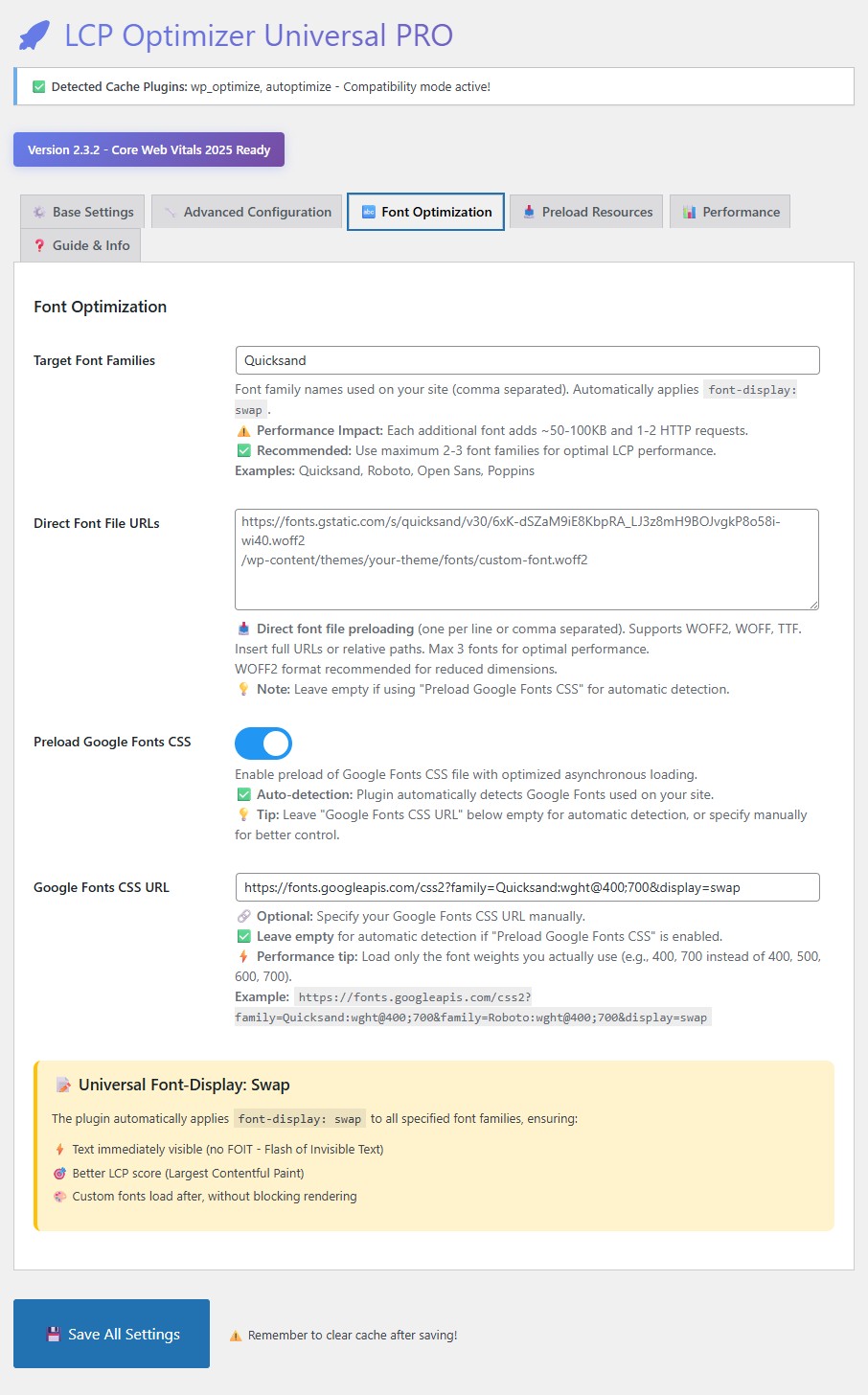 Manual Google Fonts URL control with automatic preloading and font-display swap.
Preload Resources - Critical Assets
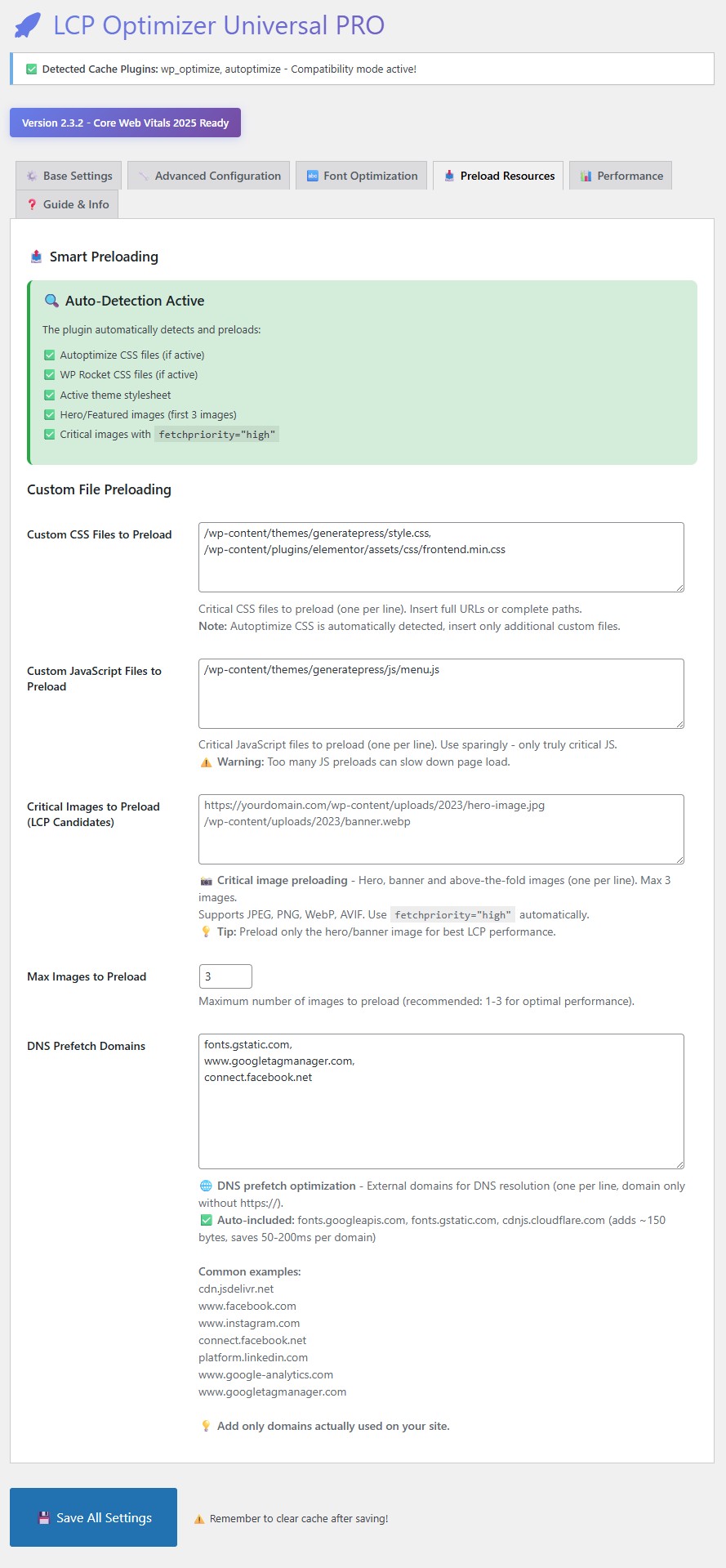 Preload critical CSS, JavaScript, and LCP images for faster rendering.
Performance Tools - Built-in Testing
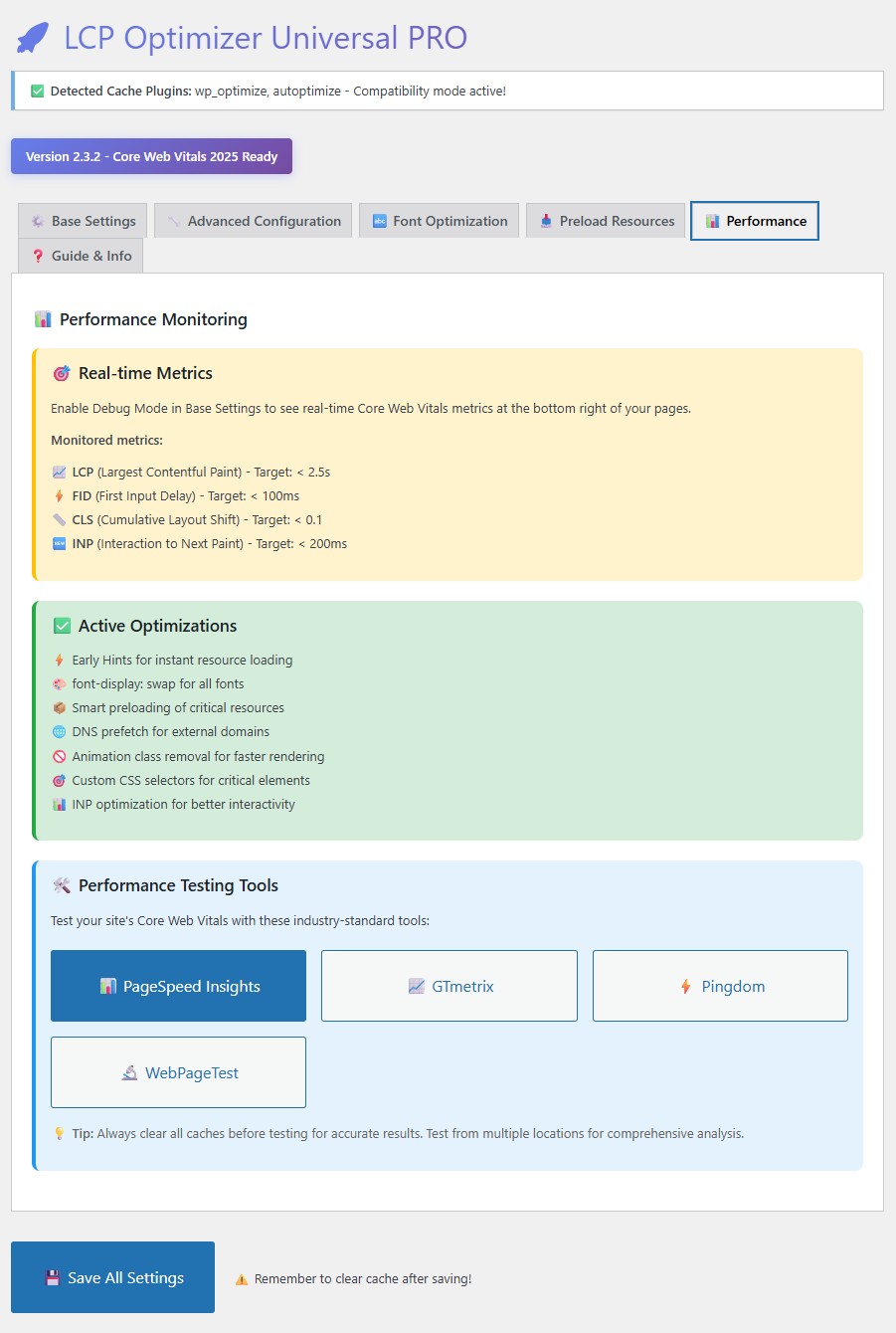 One-click access to PageSpeed Insights, GTmetrix, Pingdom, and WebPageTest.
Guide & Info - WP Rocket Integration
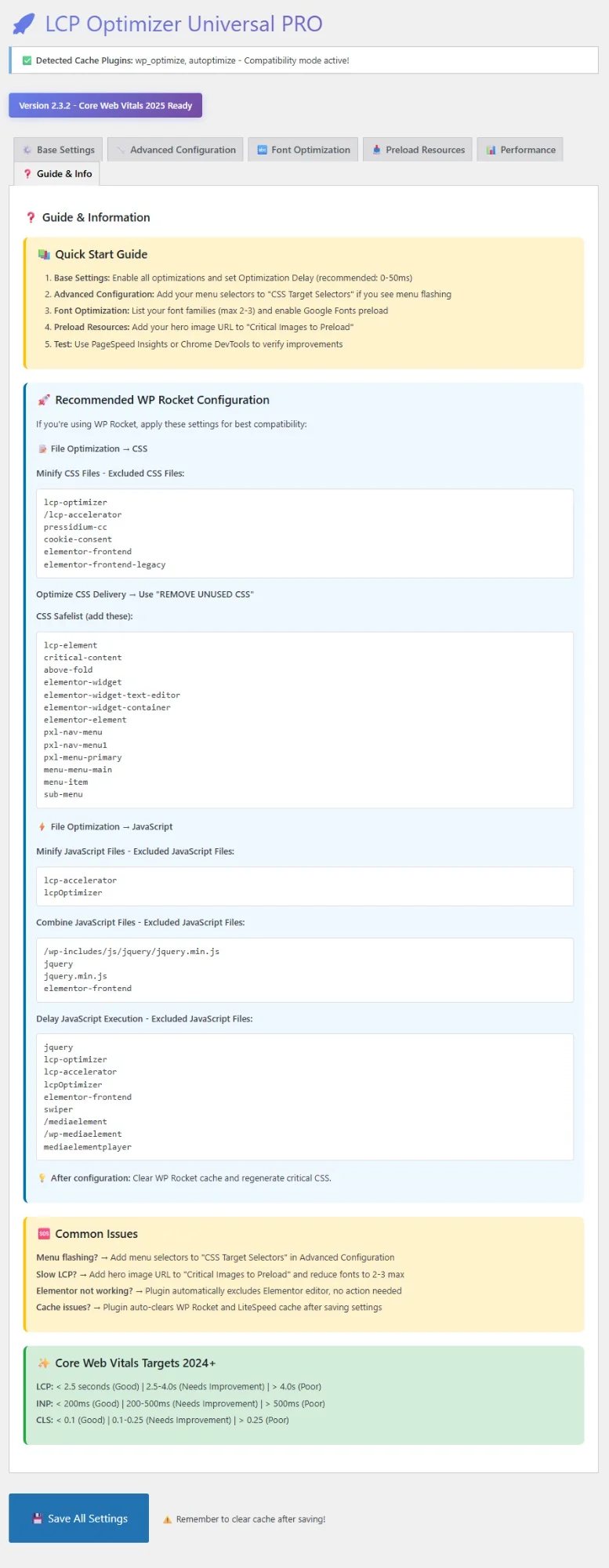 Complete WP Rocket configuration guide and troubleshooting tips.
✨ What’s New in Version 2.3.4
UX Improvement
- Fixed hardcoded default fonts in Target Font Families field
- Field now properly empty by default instead of auto-populating with “Quicksand, Roboto, Open Sans”
- Users have full control over which fonts to optimize
✨ What’s New in Version 2.3.3
🔍 Improved Cache Plugin Detection
- ENHANCED: More honest messaging for cache plugin detection
- NEW: Shows “may be inactive” to prevent user confusion
- IMPROVED: Transparency about detection limitations while keeping compatibility mode active for safety
New detection message:
🔍 Detected Cache Plugins: wp_optimize (may be inactive)
⚙️ Compatibility mode active for safety
Why this change: Due to WordPress plugin loading timing, detection may include installed-but-inactive plugins. Rather than hide this technical limitation, we’re transparent about it.
📚 Enhanced Documentation
Google Fonts
- NEW Tip 2: Clarifies that manual Google Fonts URL always takes priority over auto-detection
- Prevents confusion about when auto-detection is used vs manual URL
JavaScript Preload Warnings
Explicit examples of what NOT to preload:
- ❌ Analytics (Google Analytics, GTM)
- ❌ SEO plugins (Yoast, All-in-One SEO)
- ❌ Chat widgets
- ❌ Social sharing buttons
- ❌ Non-critical third-party scripts
Why: Preloading these scripts can actually slow down LCP instead of improving it.
💡 User Experience Improvements
- Clearer messaging throughout admin interface
- Better guidance on when to use advanced features
- Prevents common misconfigurations that harm performance
- More honest about plugin capabilities and limitations
🛠️ Previous Updates (2.3.2)
- FIXED: Re-added “Google Fonts CSS URL” input field in Font Optimization tab
- NEW: Manual control over Google Fonts URL for better optimization
- IMPROVED: Performance tip to load only required font weights
🛠️ Previous Updates (2.3.1)
- NEW: Quick-access buttons to performance testing tools (PageSpeed Insights, GTmetrix, Pingdom, WebPageTest)
- One-click access to industry-standard testing platforms
🎯 Key Features
✅ Core Web Vitals Ready
- LCP (Largest Contentful Paint) < 2.5s
- INP (Interaction to Next Paint) < 200ms
- CLS (Cumulative Layout Shift) < 0.1
⚡ Technical Optimizations
🔤 Font Optimization
- Global
font-display: swapfor instant text rendering - Direct preload for WOFF2/WOFF/TTF files
- Asynchronous Google Fonts loading
- Manual Google Fonts URL control (with auto-detection fallback)
- Performance tip: Each font adds ~50-100KB
📥 Resource Preloading
- Auto-detects critical CSS (WP Rocket, Autoptimize)
- Preloads up to 3 LCP images
- DNS prefetch with auto-included domains:
- fonts.googleapis.com
- fonts.gstatic.com
- cdnjs.cloudflare.com
- (Adds ~150 bytes, saves 50-200ms per domain)
🖼️ Image Optimization
fetchpriority="high"for LCP candidates- Smart lazy loading (skips above-the-fold images)
- Aspect-ratio preservation to prevent CLS
- Automatic width/height attributes
🎨 CSS & Performance
- Early Hints (HTTP/2+) for fastest resource hints
- INP optimization via intelligent debouncing
- Minimal CSS injection (<2KB)
- No jQuery dependency
🔒 Safety Guarantees
- ❌ No interference with dropdown menus
- ✅ 100% native theme menu control
- ✅ Compatible with all major page builders
- ✅ No conflicts with cache plugins
💻 Requirements
| Requirement | Version |
|---|---|
| WordPress | 6.0+ |
| PHP | 7.4+ |
| Server | Apache/Nginx |
| Optional | HTTP/2+ for Early Hints |
📥 Installation
Method 1: Download from GitHub (Recommended)
- Download the latest release:
- Go to Releases
- Download
lcp-optimizer-universal-pro-v2.3.3-updated.zip
- Upload to WordPress:
- Go to Plugins → Add New → Upload Plugin
- Choose the ZIP file
- Click Install Now
- Activate the plugin
Method 2: Manual Installation
cd /path/to/wordpress/wp-content/plugins/
unzip lcp-optimizer-universal-pro-v2.3.3-updated.zip
Then activate in WordPress admin.
Method 3: Git Clone (For Developers)
cd /path/to/wordpress/wp-content/plugins/
git clone https://github.com/emanuelcelano/lcp-optimizer-universal-pro.git
🚀 Quick Start Guide
1️⃣ Basic Setup (2 minutes)
- Go to LCP Optimizer in WordPress admin
- Click “Enable LCP Optimization”
- Click “Save Changes”
- Clear all caches (plugin, theme, server)
- Test with PageSpeed Insights
That’s it! The plugin works out-of-the-box with zero configuration.
2️⃣ Advanced Setup (Optional)
Add Your Hero Image for Preload
- Open your homepage in Chrome DevTools
- Run:
PerformanceObserverto find LCP element - Copy image URL
- Add to “Critical Images Preload” in plugin settings
Optimize Google Fonts
- Go to Font Optimization tab
- Add your Google Fonts CSS URL (e.g.,
https://fonts.googleapis.com/css2?family=Roboto:wght@400;700&display=swap) - Pro tip: Use only 2-3 font weights maximum
- Note: Manual URL takes priority over auto-detection
Fine-tune for Your Theme
- Add theme-specific menu selectors if needed:
.main-menu, .menu-item, .sub-menu
🔧 WP Rocket Integration
If you use WP Rocket, follow these settings for best results:
⚙️ File Optimization
Exclude from CSS Minification:
lcp-optimizer
/lcp-accelerator
elementor-frontend
CSS Safelist (Prevent Menu Issues):
lcp-element
pxl-nav-menu
menu-item
sub-menu
dropdown
⚙️ JavaScript Optimization
Exclude from JS Delay:
jquery
lcp-optimizer
elementor-frontend
mediaelementplayer
[Full WP Rocket guide available in plugin admin →]
📊 Expected Results
| Metric | Before | After | Improvement |
|---|---|---|---|
| LCP | 4.5s | 2.1s | -53% ⚡ |
| INP | 350ms | 180ms | -49% 🎯 |
| CLS | 0.25 | 0.05 | -80% ✅ |
| PageSpeed Score | 65 | 92 | +27 points 🚀 |
Results may vary based on hosting, theme, and content.
🔍 Troubleshooting
❓ Cache Plugin Shows as Detected But It’s Inactive?
This is normal! Due to WordPress plugin loading timing, the detection may include installed-but-inactive plugins. The compatibility mode stays active for safety, which doesn’t negatively affect performance.
❓ Menu Flashing on Page Load?
Solution: Add menu-specific CSS selectors in plugin settings:
.main-navigation, .menu-item, .sub-menu, .dropdown-menu
❓ LCP Not Improving?
Checklist:
- ✅ Identify LCP element using Chrome DevTools Performance tab
- ✅ Add LCP image URL to “Critical Images Preload”
- ✅ Reduce Google Fonts to 2-3 weights maximum
- ✅ Clear all caches (WP Rocket, browser, CDN)
- ✅ Test in incognito mode
❓ Conflicts with Other Plugins?
Known Compatible Plugins:
- ✅ WP Rocket
- ✅ LiteSpeed Cache
- ✅ Autoptimize
- ✅ Elementor / Elementor Pro
- ✅ Divi Builder
- ✅ Yoast SEO
- ✅ Rank Math
Known Issues:
- ⚠️ Some lazy-load plugins may conflict. Disable duplicate lazy-loading features.
❓ Debug Mode
Enable debug panel (admin only):
- Add to
wp-config.php:define('WP_DEBUG', true); - View debug info in plugin settings → Debug tab
🧪 Testing Your Site
Use the built-in testing tools in the plugin:
- PageSpeed Insights (Google’s official tool)
- GTmetrix (Detailed waterfall analysis)
- Pingdom (Global server locations)
- WebPageTest (Advanced filmstrip view)
All tools are pre-filled with your site URL for instant testing!
🤝 Contributing
We welcome contributions! Here’s how:
🐛 Report Bugs
Open an issue with:
- WordPress version
- PHP version
- Theme name
- Steps to reproduce
💡 Request Features
Open an issue tagged enhancement
🔧 Pull Requests
- Fork the repository
- Create feature branch (
git checkout -b feature/AmazingFeature) - Commit changes (
git commit -m 'Add AmazingFeature') - Push to branch (
git push origin feature/AmazingFeature) - Open a Pull Request
📜 License
This project is licensed under the GPL-2.0 License - see the LICENSE file for details.
TL;DR: You can use, modify, and distribute this plugin freely. Commercial use is allowed.
🆘 Support
Free Support
- 📖 Documentation
- 💬 GitHub Issues
- ⭐ FAQ
Professional Support
For custom implementation or consulting:
Dr. Emanuel Celano
Cybersecurity Expert · Digital Forensics Consultant · Developer
Informatica in Azienda - Bologna, Italy
📧 Email: info@analisideirischinformatici.it
🌐 Professional Services:
- analisideirischinformatici.it - IT Risk Analysis & Cybersecurity Consulting
- certifywebcontent.com - Digital Content Certification (22 languages)
- contentprotector.eu - Content Protection & Certification Services
- certifiedpressreleases.com - Legally Certified Press Releases (eIDAS + SHA-256)
Empowering creators, companies, and legal professionals with trusted digital evidence solutions since 2001.
👨💻 Author
Dr. Emanuel Celano
Digital Forensics & Cyber Incident Response Specialist
Informatica in Azienda
- 💼 LinkedIn: emanuelcelano
- 🌐 Website: analisideirischinformatici.it
⭐ Show Your Support
If this plugin helped your site, please:
- ⭐ Star this repository
- 🐦 Tweet about it with #LCPOptimizer
- 📝 Write a review (coming soon on WordPress.org)
- 🔗 Share with others
📈 Stats


🗺️ Roadmap
Version 2.4 (Q1 2025)
- Automatic LCP element detection
- Built-in image compression
- Performance report generation
- Multi-language support (Spanish, French, German)
Version 3.0 (Q2 2025)
- WordPress.org repository submission
- One-click optimization presets
- Integration with Google Search Console
- Advanced caching strategies
Made with ❤️ for WordPress Performance
Helping websites pass Core Web Vitals since 2024